
Open your server logs and a retrieval from an AI assistant is a single line: one GET request, one HTML response, no follow-up requests for the scripts that build your page in a visitor's browser. That is the whole interaction. The crawler takes the bytes your origin returned, parses the text out of them, and leaves. Whatever your JavaScript would have added a moment later - the article body injected by a React component, the lazy-loaded second half of a listing page, the navigation built at runtime - never exists as far as the assistant is concerned. Testing whether your own site survives that treatment takes about two minutes, and the fix is a rendering decision rather than a content one.
Which crawlers render JavaScript and which do not
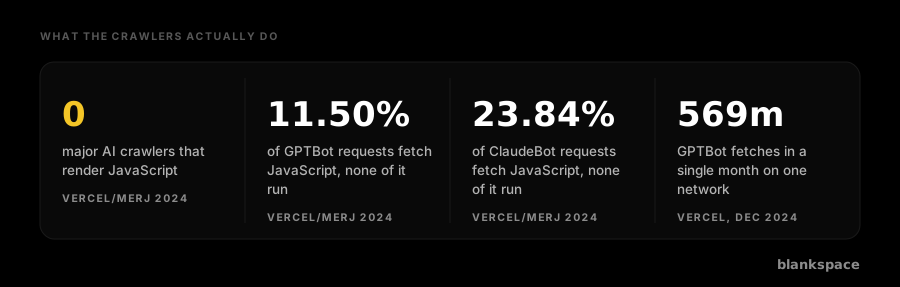
The most systematic public evidence remains the joint study by Vercel and MERJ, published in December 2024, which analysed real crawler traffic across Vercel's network and validated the findings on separate technology stacks. Its conclusion was unambiguous: none of the major AI crawlers render JavaScript. That list covered OpenAI's GPTBot, OAI-SearchBot and ChatGPT-User, Anthropic's ClaudeBot, Meta-ExternalAgent, ByteDance's Bytespider, PerplexityBot, and Common Crawl's CCBot.
The detail that makes the point is that these crawlers do request JavaScript files. GPTBot fetched JavaScript in 11.50% of its requests and ClaudeBot in 23.84%, but neither executed any of it. They collect the script as text, in the same way they collect an image or a stylesheet, and never run it.
Two crawlers are exceptions. Applebot renders through a browser-based crawler, processing JavaScript, CSS and Ajax requests for a full page render. Google's grounding for Gemini runs on Googlebot's infrastructure, which has used a headless Chrome renderer for years, so it renders fully. It is worth being precise about Google here, because the naming confuses people: Google-Extended is a robots.txt product token, not a user agent. Nothing called Google-Extended ever appears in your logs. The fetching is done by Googlebot, and the token only governs whether what Googlebot collected may be used for Gemini and Vertex AI. Google's own documentation states that Google-Extended does not affect Search inclusion and is not a ranking signal.
For scale, the same Vercel data recorded 569 million GPTBot fetches and 370 million ClaudeBot fetches in a single month against Googlebot's 4.5 billion. The non-rendering crawlers are not a rounding error in your traffic.
Why AI crawlers skip rendering
Rendering is expensive. Executing JavaScript means running a headless browser for every URL, waiting for network requests to settle, and holding memory open while it does. Google absorbed that cost over two decades because search indexing is its product. An AI company retrieving a handful of pages to answer one live question is optimising for latency and unit cost instead, and a raw HTML fetch returns in tens of milliseconds where a full render takes seconds.
There is a second reason that matters more for planning. Retrieval for a live answer happens while a user waits. A crawler that renders is a crawler that makes the assistant slower, and no assistant is going to trade its response time for your client-side content. This is a design decision, not a temporary gap in capability, and there is no indication that it is about to change.
The exception nobody accounts for: agentic browsers do render
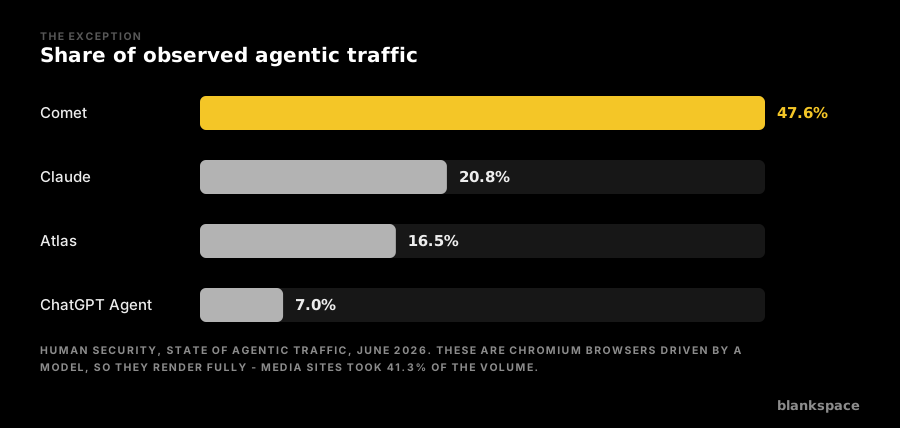
There is one category of AI traffic that executes JavaScript perfectly well, because it is not a crawler at all. Agentic browsers such as Perplexity's Comet and OpenAI's Atlas are Chromium browsers driven by a model. They render your page exactly as a human visitor's browser would.
This is now a substantial share of automated traffic. HUMAN Security's State of Agentic Traffic benchmark for June 2026 put Comet at 47.6% of observed agentic traffic, Claude at 20.8% and Atlas at 16.5%, with ChatGPT Agent at 7.0%. Media sites took 41.3% of that volume, second only to ecommerce at 43.8%, and 79% of agentic activity landed on product, search and article routes rather than checkout.
So publishers face two AI traffic types with opposite technical profiles. Server-side crawlers see only your initial HTML. Agentic browsers see everything but behave nothing like a human once they are on the page, ignoring ad viewability, scroll depth and every other engagement signal your monetisation depends on. Neither one is served by a strategy built for human browsers.
How to test what an AI crawler actually sees on your site
Do not use your browser's Inspect panel. It shows the rendered DOM after JavaScript has run, which is the one view no AI crawler ever gets. Three checks give you the real answer.
First, request the page as a crawler does and read what comes back:
curl -s -A "GPTBot" https://example.com/your-article | less
Search that output for a distinctive sentence from the middle of your article body. If it is not there, GPTBot does not have it.
Second, use View Page Source rather than Inspect, on a representative page of each template you run: article, section index, author page, product page. Templates fail independently, and it is common for articles to be server-rendered while section indexes and recirculation modules are not.
Third, disable JavaScript in Chrome DevTools with the command palette and reload. What remains on screen is close to what a non-rendering crawler receives, including whether your headline, standfirst, body copy, byline and publication date survive.
Run all three against your key pages and record which elements disappear. That list is your remediation backlog.
What breaks when content is client-side rendered
The obvious loss is body copy, but it is rarely the only one. Titles and meta descriptions set by a client-side router are absent, so an assistant has no reliable page title to cite. Internal links built at runtime are absent, so crawlers never discover the pages they point to and your topical depth becomes invisible. Structured data injected by a tag manager is absent, so your schema does nothing. Content behind a "load more" control is absent by definition. Recirculation modules and related-article rails, which are how a crawler learns what else you cover, are absent on most template implementations.
The compounding effect is what hurts. A page that is retrieved but only half readable is less likely to be cited than a thinner page that is fully readable, because the assistant is choosing between what it can actually extract.
How to fix it
Server-side rendering, static generation and incremental static regeneration all put the content in the initial HTML response, and every mainstream framework now defaults to one of them. This is the correct fix and it benefits human visitors too, because content that arrives in the first response arrives faster.
Prerendering, sometimes called dynamic rendering, serves a pre-executed HTML snapshot to bots while humans continue to receive the client-rendered application. It is the pragmatic retrofit for a large legacy single-page application that cannot be rebuilt this quarter. Two cautions apply. Google has described dynamic rendering as a workaround rather than a long-term solution, and the snapshot has to match what a human sees, because serving materially different content to bots is cloaking. Keep semantic parity and you are on safe ground.
Edge rendering sits between the two, generating HTML at the CDN layer so the origin application is untouched. For publishers who already run their delivery through a CDN, this is often the shortest path.
Whichever route you take, keep the priority order straight. Main article text, headline, byline, date, structured data and internal navigation belong in the initial HTML. Client-side rendering remains entirely appropriate for comment threads, live chat widgets, personalisation and interactive tools that no crawler needs.
What this means commercially, not just editorially
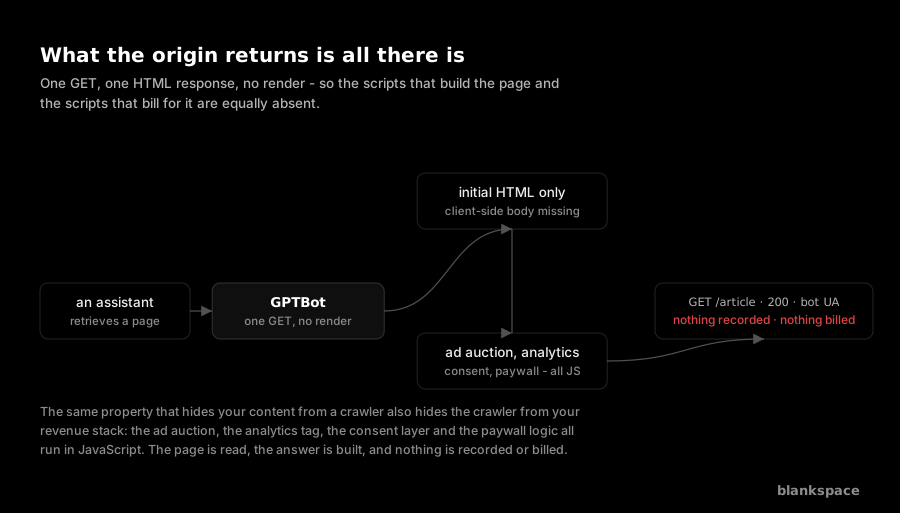
Fixing rendering makes your content readable. It does not make the visit pay. The same property that hides your content from a crawler also hides the crawler from your revenue stack: your ad auction, your analytics tag, your consent layer and your paywall logic all run in JavaScript, so a non-rendering retrieval triggers none of them. The page is read, the answer is built, and nothing is recorded or billed.
That is the gap blankspace works in. It identifies live retrievals at the CDN edge, before any page render, and places relevant brand context into the text the agent actually reads, with the retrieval measured and attributed. Server-side rendering and edge monetisation are the same architectural move applied to two different problems: if the agent only ever sees what your origin returns, then both your content and your commercial layer have to live there.
Frequently asked questions
Does GPTBot render JavaScript?
No. GPTBot fetches the raw HTML and parses it without executing scripts. Vercel and MERJ found it downloading JavaScript files in 11.50% of requests while never running them. The same applies to OpenAI's other agents, OAI-SearchBot and ChatGPT-User.
Which AI crawlers do render JavaScript?
Applebot renders through a browser-based crawler, and Google's Gemini grounding renders because it uses Googlebot's headless Chrome infrastructure. Separately, agentic browsers such as Comet and Atlas render fully, because they are real Chromium browsers rather than crawlers.
Will AI crawlers start rendering JavaScript soon?
There is no sign of it. Rendering adds cost and latency to a retrieval that happens while a user waits for an answer, so the incentive runs the other way. Planning on the assumption that it will change is not a strategy.
Is my React or Vue site invisible to AI assistants?
Only if it renders exclusively in the browser. React, Vue and Angular applications built with server-side rendering or static generation are fully readable. The framework is not the problem; the rendering mode is. Test with a curl request using a crawler user agent to find out which one you have.
Is serving different HTML to AI crawlers considered cloaking?
Not if the content is substantively the same. Prerendering a snapshot of the page your users see is an accepted pattern and Google documents it, though it treats it as a workaround rather than a permanent architecture. Serving bots materially different content from humans is cloaking and carries real risk.