

When someone clicks through to your site from a ChatGPT answer or a Perplexity citation, Google Analytics has to read the referrer header on that click to know where it came from. That single dependency is the whole problem. If the header is present and matches a name Google recognises, the visit is now filed under a channel called AI Assistant. If the header is stripped, which happens on the majority of AI clicks, the same visit lands in Direct next to bookmarks and typed URLs, and no report in GA4 will ever tell you it came from an assistant. Tracking AI traffic accurately means capturing both cases: configuring GA4 to catch the referrers it can see, and using landing-page and campaign signals to recover the traffic it cannot.
Does GA4 track AI traffic natively now?
Partly. On 13 May 2026 Google added an AI Assistant channel to the Default Channel Group in GA4, and it reached broad availability around 7 June 2026. When GA4 detects a referrer from a recognised assistant it assigns the medium ai-assistant and files the session under AI Assistant automatically, with no configuration required. Google's live documentation lists ChatGPT, Gemini, DeepSeek, Copilot and Grok.
There are three catches worth knowing before you rely on it. Perplexity is not in Google's definition, so Perplexity referrals still fall into the ordinary Referral channel. The change is not retroactive, so historic AI traffic stays filed under whatever channel it was originally assigned. And, most importantly, the native channel only sees referrers that survive the click, which as the next section explains is a minority of AI traffic.
Why most AI referrals still show up as Direct
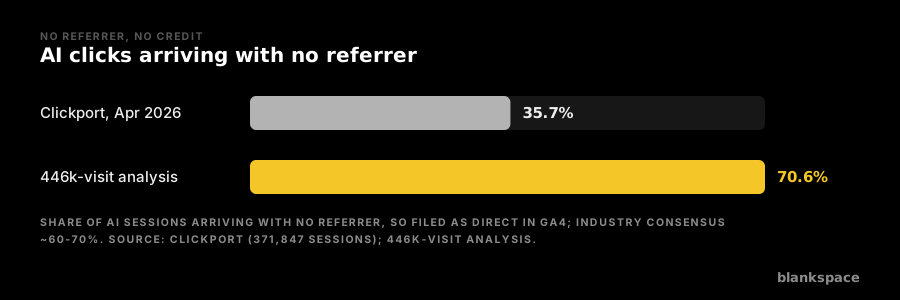
Analytics platforms classify a visit as Direct when it arrives with no referrer information at all. A large share of AI clicks arrive exactly that way. Clickport, analysing 371,847 sessions across customer sites in April 2026, found 35.7 per cent of AI traffic arrived with no referrer. A broader analysis of more than 446,000 AI-driven visits put the figure at 70.6 per cent with no referrer header. Industry estimates converge on roughly 60 to 70 per cent of real AI sessions landing in Direct.
Four things strip the referrer. The referring site's own referrer policy can suppress it. Links inside some assistants carry a noreferrer attribute by design. The in-app browsers inside mobile apps, where a growing share of assistant use now happens, frequently pass nothing. And when a user simply copies a URL out of an answer and pastes it into a new tab, there is no referrer to pass. The result is that even a perfectly configured GA4 property is measuring only the visible tail of AI-referred visits, not the whole of it.
How to set up an AI traffic channel group in GA4
A custom channel group lets you define an AI Traffic channel that catches the assistants Google's native channel misses, most notably Perplexity, and gives you one consistent bucket you control. The steps are quick.
Open Admin, then under Data Display choose Channel Groups. Create a new channel group, or edit an existing custom one. Add a new channel named something like AI Traffic and set its condition to match the source against a regular expression of AI referrer domains. Then drag that channel above Referral in the priority order. This last step matters: GA4 evaluates channels top to bottom and stops at the first match, so if Referral sits above your AI channel the traffic is claimed before it ever reaches you.
The regex to catch AI referrers
Match the session source against a pattern covering the current assistants. A comprehensive starting pattern, published by Terminus, is:
^(chatgpt.com|chat.openai.com|claude.ai|perplexity.ai|www.perplexity.ai|gemini.google.com|bard.google.com|copilot.microsoft.com|deepseek.com|grok.com|x.ai|meta.ai|you.com|poe.com)$
Treat this as a living pattern, not a one-off. New assistants and new domains appear constantly, and practitioners recommend reviewing the regex roughly every quarter so the gaps that open up between releases do not quietly reclassify your traffic.
How to recover the AI traffic that has no referrer
Because most AI clicks carry no referrer, the referrer-based methods above only ever catch part of the picture. Three techniques help close the gap. Watch for correlated movements in Direct traffic to specific landing pages, particularly deep internal URLs that people rarely type or bookmark; a spike there often signals AI referral that lost its header. Combine that with server-side or log analysis, where the raw request is visible before the browser strips anything. And, where you control the links, use UTM parameters so the campaign tag survives even when the referrer does not. None of these fully solves the problem, but together they turn an unknowable Direct bucket into a defensible estimate.
What AI referral traffic is worth once you can see it
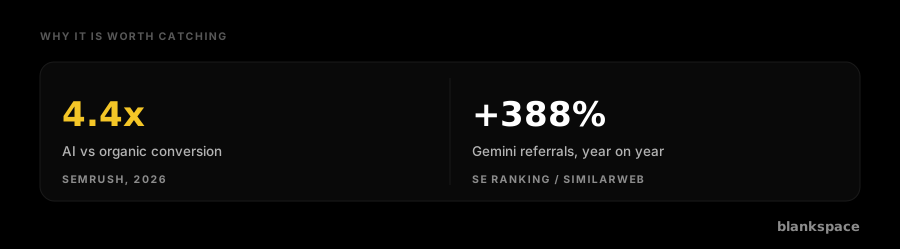
The effort is justified because this traffic behaves differently from the rest of your mix. AI-referred visitors tend to arrive later in a decision, having already been given a summarised answer, and they convert accordingly. Semrush's 2026 analysis put the average conversion advantage of AI search traffic at about 4.4 times traditional organic search. The volume is climbing sharply too: SE Ranking recorded ChatGPT referral traffic hitting an all-time high in May 2026, rising sharply in the days after ChatGPT began surfacing clickable brand links inside answers, while Gemini's referral traffic to external sites grew 388 per cent year on year. A channel growing this fast, converting this well, and defaulting into Direct is precisely the channel you cannot afford to leave unmeasured.
The AI traffic GA4 will never show you
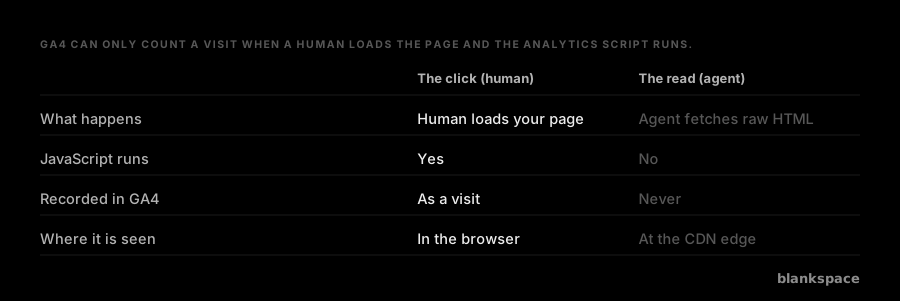
Even a fully configured GA4 property has a hard ceiling: it can only count a visit when a human loads your page and the analytics JavaScript runs. The AI Assistant channel and your custom regex both track the human who clicks through from an answer. Neither can see the read that produced the answer in the first place. When a live search agent fetches your page in real time to compose a response, it takes the raw HTML and leaves without executing any script, so no visit is ever recorded, whatever channel rules you write. That read is where much of the value now sits, because it is the moment your content is actually used, and it is invisible above the browser. blankspace measures that layer at the CDN edge, classifying each AI agent and attributing it before JavaScript would have run, which is the part of AI traffic that referrer tracking cannot reach by design. GA4 tells you who arrived; the edge tells you who read.
Frequently asked questions
Does GA4 have an AI traffic channel by default?
Yes, since 13 May 2026, with broad availability from around 7 June 2026. GA4's Default Channel Group now includes an AI Assistant channel that automatically files traffic from ChatGPT, Gemini, DeepSeek, Copilot and Grok when the referrer is present. It does not include Perplexity, it is not retroactive, and it cannot capture the majority of AI clicks that arrive with no referrer.
Why does my ChatGPT traffic show as Direct in GA4?
Because the click reached you with no referrer header, which GA4 files as Direct. This is common with AI clicks: the referrer can be removed by the referring site's referrer policy, by a noreferrer attribute on the link, by an app's in-app browser, or by a user copying and pasting the URL. Roughly 60 to 70 per cent of AI sessions arrive this way, so a large share of your genuine AI traffic will be sitting in Direct.
How do I track Perplexity traffic specifically in GA4?
Perplexity is not covered by GA4's native AI Assistant channel, so you need a custom channel group. Create an AI Traffic channel whose condition matches the source against a regex that includes perplexity.ai and www.perplexity.ai, and place that channel above Referral in the priority order so the traffic is claimed before it falls into Referral.
How often should I update my AI referral regex?
About every quarter. New assistants launch, existing ones add or change domains, and a pattern that is complete today will have gaps within a few months. A quarterly review of the domains you are matching keeps the AI Traffic channel accurate rather than slowly leaking sessions into Referral and Direct.
Can analytics ever capture the full picture of AI traffic?
Not on its own. Client-side analytics like GA4 can only record visits where a human loads the page and the tracking script runs, so it captures the AI-referred click but never the underlying agent read that composed the answer, and even for the clicks it misclassifies the large no-referrer share as Direct. A complete picture needs the visible click layer measured in GA4 and the invisible read layer measured below the browser, at the server or the CDN edge, where the raw request is seen before anything is stripped.